Document Scans
Straighten Photos & Document Scans in Seconds
Ever snapped a quick photo of a document or a whiteboard only to find it's crooked or hard to read? PerspectiveFix straightens skewed images instantly, right in your browser — no software to install, no accounts to create, and your images never leave your device.
Drop your image here or click to upload
Supports JPG, PNG, WebP • Paste from clipboard (Ctrl+V)
Original – Drag the corners
—
Fixed – Ready to download
—
How It Works
1
Upload
Drop or pick your tilted photo
2
Drag Corners
Move the 4 handles to mark what should be straight
3
Fix Instantly
Watch as your image is automatically straightened
4
Download
Get your corrected image at full quality
Now supporting high-quality JPEG and lossless WebP formats with adjustable quality sliders, plus instant single-page PDF document generation.
Why do your photos end up looking crooked?
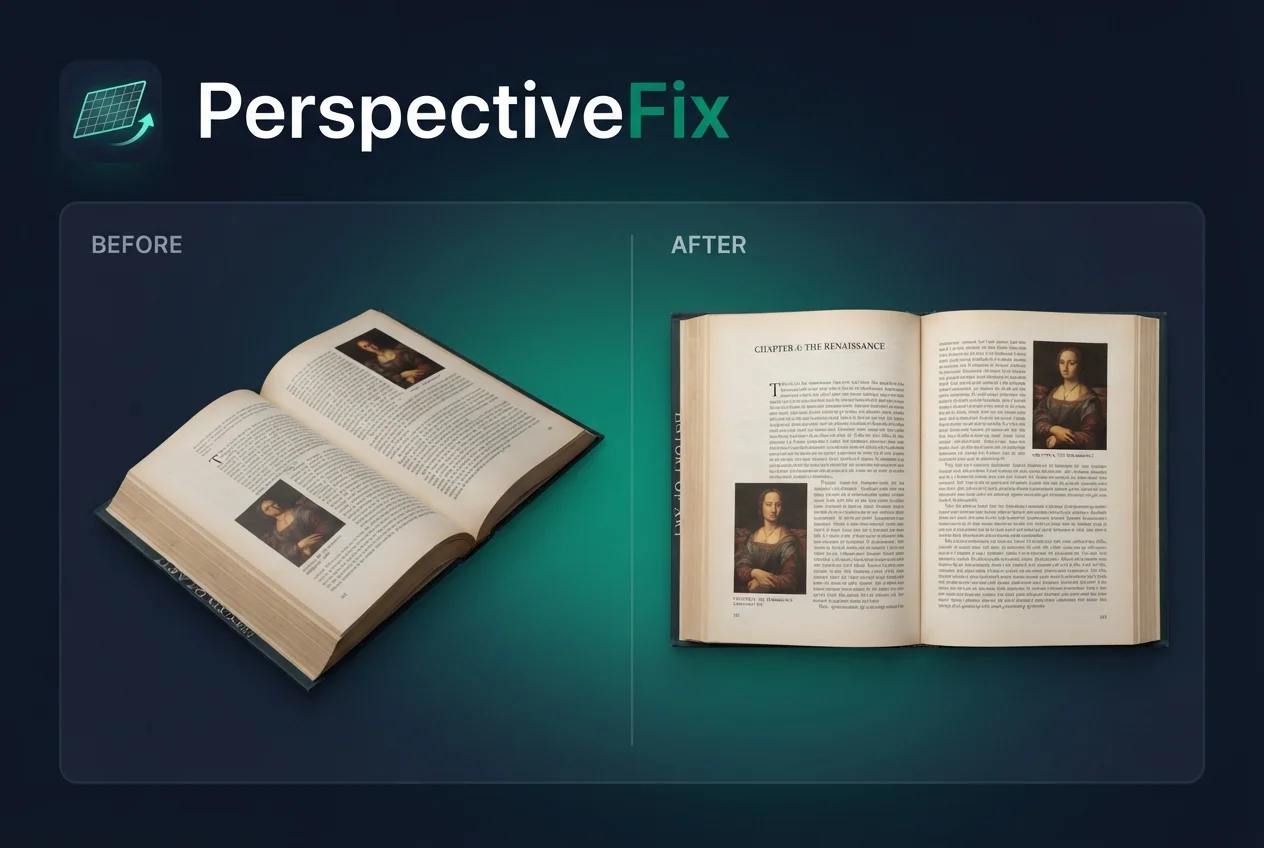
It happens all the time: you're trying to capture a receipt, a page from a book, or notes from a meeting, but you can't get perfectly parallel to the surface. This results in a "trapezoid" effect where one side is wider than the other, making text look stretched and hard to read.
PerspectiveFix solves this by using a professional-grade perspective warp algorithm. By simply marking the four corners of your document, the tool mathematically "pulls" the image flat, giving you a clean, rectangular result as if it were scanned by a high-end office scanner.
Designed for your everyday needs:
- ✅ Professional Document Scans: Turn crooked photos of receipts or contracts into perfectly flat, readable documents.
- ✅ Save Your Study Notes: Straighten whiteboard lectures and book pages so you can focus on learning, not squinting.
- ✅ Architecture & Real Estate: Easily fix tilted horizontal or vertical lines in photos of buildings and room interiors.
- ✅ Clean Product Photography: Make your packaging and box photos look flat and professional for your online store.
Works Great With
Real Estate
Book Pages
Whiteboards
Signs & Posters
Screens
Why People Love This Tool
Your Photos Stay Private
Everything happens right here in your browser. We never see, store, or upload your images anywhere. Perfect for sensitive documents.
No Waiting Around
Since there's no server upload, you see the corrected result instantly as you move the corners. Super fast, even on slower connections.
Full Quality, No Watermarks
Download your fixed image at the original resolution. We don't slap a logo on your work—it's yours, clean and ready to use.
Frequently Asked Questions
Is PerspectiveFix really free?
Yes — completely free, no strings attached. No subscription, no premium tier, no watermark on your output. What you download is exactly what you corrected.
Do my photos get uploaded to a server?
No. Every image stays entirely on your device. PerspectiveFix runs inside your browser using the Canvas API — nothing is transmitted over the network. You can disconnect from Wi-Fi after the page loads and it still works. Safe for contracts, IDs, medical records, or any sensitive document.
Does it work on mobile?
Yes. It runs in Chrome, Safari, and Firefox on both Android and iPhone. The corner handles are touch-friendly — drag them with your finger. No app to install.
What file formats are supported?
You can upload JPG, PNG, and WebP. You can also paste an image directly from your clipboard using Ctrl+V (or Cmd+V on Mac). For export, choose JPG, WebP, or a single-page PDF — with a quality slider to control file size.
Does it only fix tilt, or can it do more?
More. After perspective correction, you get a full adjustment panel: Brightness, Contrast, Sharpen, Warmth, Grayscale, and Negative. There's also an Enhance button with two modes — Magic Color (cleans background, boosts contrast) and Deep Ink (high-contrast black-and-white for handwritten notes and receipts).
How is this different from just cropping?
Cropping cuts the edges of an image. It doesn't fix the angle. PerspectiveFix performs a homographic transformation — it mathematically warps the pixels so a skewed trapezoid becomes a perfect rectangle. Text stays horizontal. Proportions stay correct.
Can I set an exact output size in pixels?
Yes. Select "Exact size (px)" from the ratio dropdown and enter your target width and height. For A4 at 300 DPI, that's 2480 × 3508. For a square social post, 1080 × 1080. The tool automatically scales down if you exceed the 16MP limit.
Is there an undo feature?
Yes. Full undo and redo stack for corner adjustments. Keyboard shortcuts work too — Ctrl+Z to undo, Ctrl+Y to redo. There's also a Reset button that returns all four corners to their original positions.
How does this compare to CamScanner?
CamScanner's free tier adds a watermark and sends your files to their servers. PerspectiveFix has no watermark, no upload, and no account requirement. The tradeoff: PerspectiveFix is a browser tool, not a native app, so there's no built-in camera integration. You take the photo separately and open it here.
Is there a limit on how many images I can fix?
None. Use it once or a hundred times — no account, no login, no daily cap. Processing happens locally on your device, so there are no server costs to pass on.